Opencode
Use Opencode with FinOps to access any AI provider through a terminal-based coding assistant with virtual keys and observability.
Opencode is an AI-powered coding application that supports OpenAI-compatible APIs. By pointing it at FinOps, you get access to any provider/model in your FinOps configuration, plus governance features like virtual keys, built-in observability, and per-model options for reasoning effort, thinking budget, and more.

If your Allowed Headers are already set to *, you can skip this note. If not and you face issues integrating FinOps with OpenCode, try switching to * or adding the specific headers required by your client. By default, FinOps whitelists: Content-Type, Authorization, X-Requested-With, X-Stainless-Timeout, and X-Api-Key.
Setup
1. Configure OpenCode to work with FinOps
OpenCode uses a JSON config file (opencode.json) to configure providers. Point your provider's baseURL to FinOps.
Using OpenAI-compatible endpoint
Route OpenAI and other providers through FinOps's OpenAI endpoint:
{
 "$schema": "https://opencode.ai/config.json",
 "provider": {
 "openai": {
 "name": "FinOps",
 "options": {
 "baseURL": "{AI_GATEWAY_URL}/openai",
 "apiKey": "your-finops-key"
 },
 "models": {
 "openai/gpt-5": {},
 "anthropic/claude-sonnet-4-5-20250929": {},
 "gemini/gemini-2.5-pro": {}
 }
 }
 },
 "model": "openai/gpt-5"
}
Using Anthropic endpoint
Route Anthropic models through FinOps's Anthropic endpoint:
{
 "$schema": "https://opencode.ai/config.json",
 "provider": {
 "anthropic": {
 "name": "FinOps",
 "options": {
 "baseURL": "{AI_GATEWAY_URL}/anthropic/v1",
 "apiKey": "your-finops-key"
 },
 "models": {
 "anthropic/claude-sonnet-4-5-20250929": {}
 }
 }
 },
 "model": "anthropic/claude-sonnet-4-5-20250929"
}
You can also use the /connect command in the OpenCode TUI to configure credentials interactively, then update the baseURL in your config file.
Virtual Keys
When FinOps has virtual key authentication enabled, set apiKey in your provider options to your virtual key:
"options": {
 "baseURL": "{AI_GATEWAY_URL}/openai",
 "apiKey": "bf-your-virtual-key-here"
}
This lets you enforce usage limits, budgets, and access control per user or environment. For team deployments, create a separate virtual key for each team - each key can have its own rate limits, budgets, and provider access rules configured in the FinOps dashboard.
Model Selection
Set your default models in opencode.json:
{
 "model": "openai/gpt-5",
 "small_model": "anthropic/claude-haiku-4-5"
}
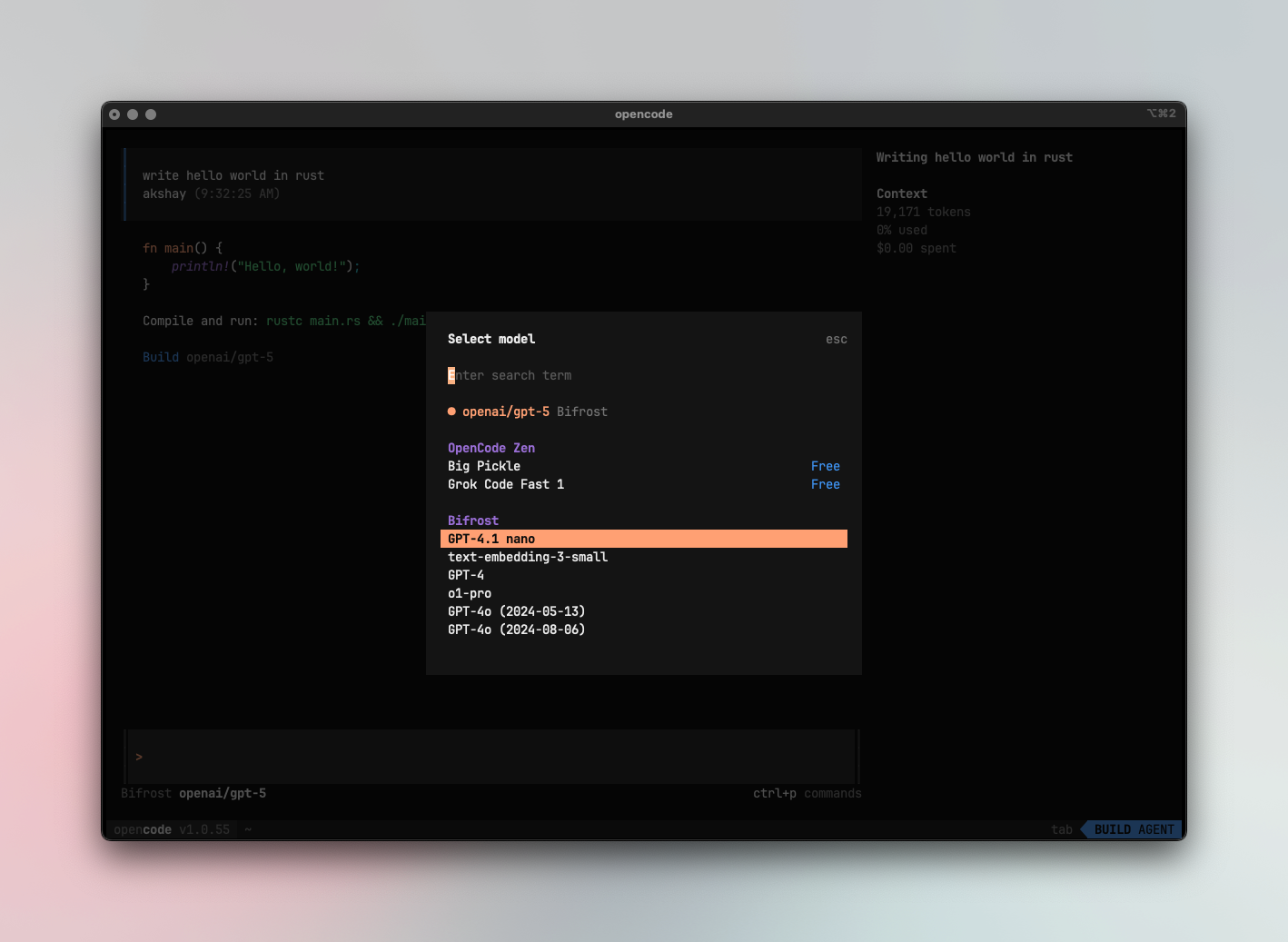
Switch models in the TUI with ctrl+p
- Use powerful models like
openai/gpt-5oranthropic/claude-sonnet-4-5-20250929for complex coding tasks - Use fast models like
groq/llama-3.3-70b-versatilefor quick completions - Set
small_modelto a lighter model for faster, lower-cost operations
Using Multiple Providers
FinOps routes requests to the correct provider based on the model name. Use the provider/model-name format to access any configured provider through the single OpenAI endpoint:
anthropic/claude-sonnet-4-5-20250929
openai/gpt-5
gemini/gemini-2.5-pro
mistral/mistral-large-latest
You can configure models from different providers with per-model options:
{
 "$schema": "https://opencode.ai/config.json",
 "theme": "opencode",
 "autoupdate": true,
 "provider": {
 "openai": {
 "name": "FinOps",
 "options": {
 "baseURL": "{AI_GATEWAY_URL}/openai",
 "apiKey": "your-finops-key"
 },
 "models": {
 "openai/gpt-5": {
 "options": {
 "reasoningEffort": "high",
 "textVerbosity": "low",
 "reasoningSummary": "auto",
 "include": [
 "reasoning.encrypted_content"
 ]
 }
 },
 "anthropic/claude-sonnet-4-5-20250929": {
 "options": {
 "thinking": {
 "type": "enabled",
 "budgetTokens": 16000
 }
 }
 }
 }
 }
 }
}
Supported Providers
FinOps supports the following providers with the provider/model-name format:
openai, azure, gemini, vertex, bedrock, mistral, groq, cerebras, cohere, perplexity, xai, ollama, openrouter, huggingface, nebius, parasail, replicate, vllm, sgl
Non-native models must support tool use for OpenCode to work properly. OpenCode relies on tool calling for file operations, terminal commands, and code editing. Models without tool use support will fail on most operations.
OpenCode connects to FinOps via a single endpoint. FinOps handles routing to the correct provider based on the model name - no per-provider configuration needed.
Observability
All OpenCode traffic through FinOps is logged. Monitor it at {AI_GATEWAY_URL}/logs - filter by provider, model, or search through conversation content to track usage.
Next Steps
- Provider Configuration - Configure AI providers in FinOps
- Virtual Keys - Set up usage limits and access control