Claude Code
Use Claude Code with FinOps to route through any provider and unlock advanced features like MCP tools and observability.
Claude Code brings AI-powered coding capabilities directly to your terminal.
Tested on Claude Code versions:
| Version | Released |
|---|---|
| 2.1.143 | 2026-05-15 |
| 2.1.132 | 2026-05-06 |
| 2.1.131 | 2026-05-06 |
| 2.1.129 | 2026-05-05 |
| 2.1.128 | 2026-05-04 |
If your Allowed Headers are already set to *, you can skip this note. If not and you face issues integrating FinOps with Claude Code,
try switching to * or adding the specific headers required by your client. By default, FinOps whitelists: Content-Type,
Authorization, X-Requested-With, X-Stainless-Timeout, and X-Api-Key.
Installing Claude Code
curl -fsSL https://claude.ai/install.sh | bashFor platform-specific instructions, visit https://code.claude.com/docs/en/overview.
Authentication Methods
There are two ways to authenticate Claude Code with FinOps:
ANTHROPIC_AUTH_TOKEN (Recommended)
Set ANTHROPIC_AUTH_TOKEN to your FinOps virtual key. Claude Code sends this token in the Authorization: Bearer header automatically. FinOps recognizes this header and uses the virtual key for routing and authentication.
Why this is recommended: You do not need to log in to an Anthropic account. No Anthropic credentials are required, as FinOps handles everything through the virtual key.
All code snippets below use this method.
ANTHROPIC_CUSTOM_HEADERS (Alternative)
Set ANTHROPIC_CUSTOM_HEADERS to x-bf-vk: your-virtual-key. This passes the virtual key as a custom header instead of the Authorization header.
Caveat: Because the virtual key is sent as a custom header rather than as the bearer token, Claude Code falls back to standard Anthropic account authentication for the Authorization header. This means you still need to log in with an Anthropic account. No credits are needed on the Anthropic account since billing goes through your FinOps virtual key, but the account login is still required.
Configuring Claude Code to work with FinOps
To avoid caching issues in Claude Code, follow these steps:
- Open your
settings.jsonand remove themodelfield if it is present. This field overwrites theenv-based model selection and can cause unexpected behavior. - Save the file.
- Start Claude Code, run the
/logoutcommand, then restart Claude Code. - When prompted to choose an authentication method:
- If you are using
ANTHROPIC_AUTH_TOKEN(recommended), no Anthropic account login is required, so you can skip this step. - If you are using
ANTHROPIC_CUSTOM_HEADERS, select "Anthropic Console account · API usage billing" when prompted.
- If you are using
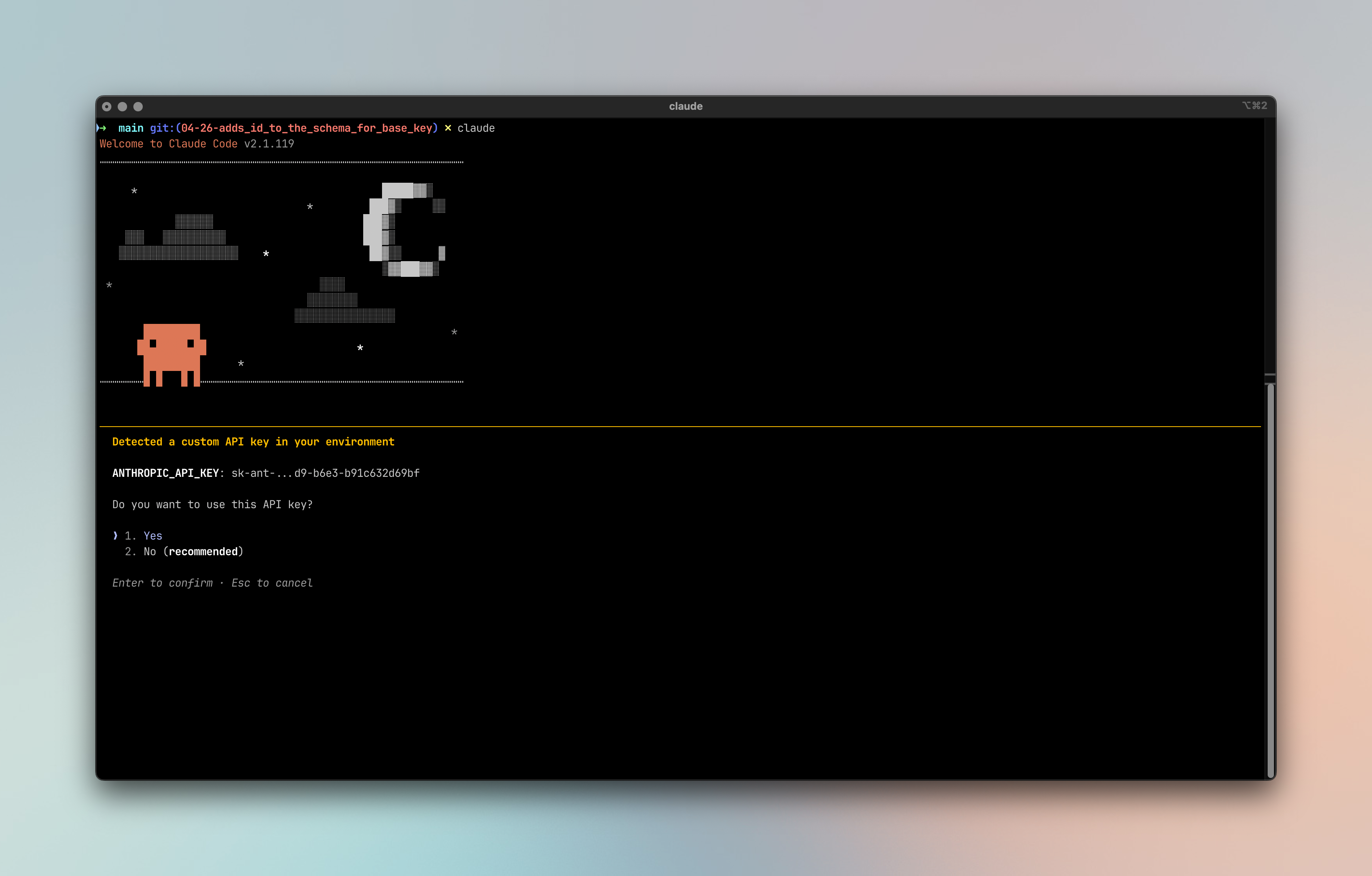
Claude Code supports multiple authentication methods. Choose the one that matches your account type.
- Update settings.json
Global settings.json is placed in your home folder.
- macOS / Linux / WSL (User Global):
~/.claude/settings.json - Windows (User Global):
%USERPROFILE%\.claude\settings.json - Project-Specific:
.claude/settings.json(located within your individual project's root directory) - Local Overrides:
.claude/settings.local.json(also in the project root, used for personal preferences that aren't shared via Git)
You will need to update the most granular settings.json.
1. Using alias
- Add following routing rules in FinOps
sonnet-model route
- Keep it a global level and assign priority you want to assign
- Add model condition as
model=sonnet-model. This option is not available out of the box - so type this string and selectCreate sonnet-model - And add second header condition; to check if the
user-agentstarts withclaude-cli. - And then you can map this model to any model you want. In the configuration given - we are using
vertex/claude-sonnet-4-6.
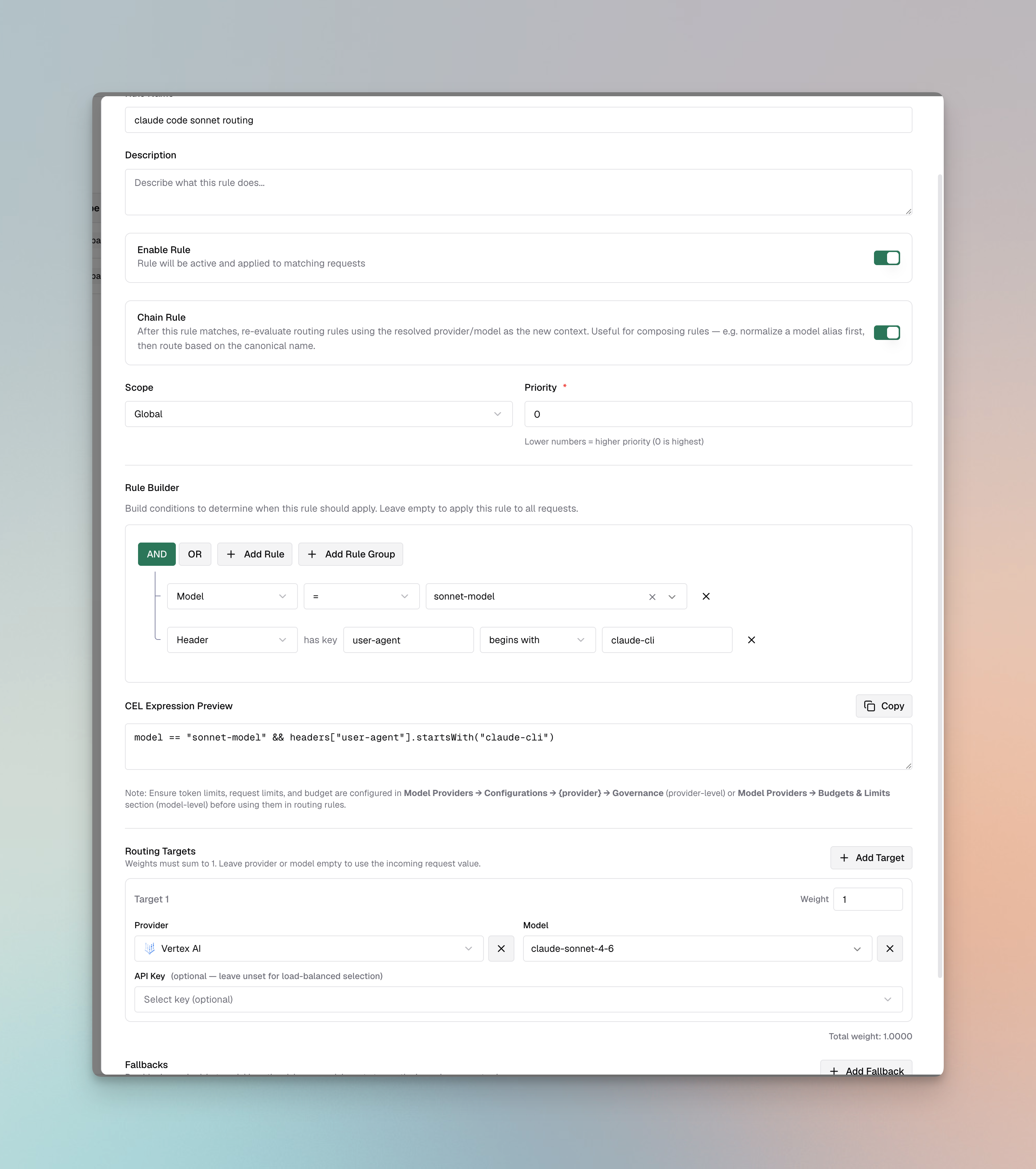
haiku-model route
- Repeat the above steps by replacing
sonnet-modelwithhaiku-model.
- Update
settings.json
The JSON snippets below show only the env key. Merge them into your existing settings.json top-level object - do not paste them as a
standalone file, or you will overwrite other settings like permissions, model, and apiKeyHelper.
"env": {
 "ANTHROPIC_BASE_URL": "{AI_GATEWAY_URL}/anthropic",
 "ANTHROPIC_AUTH_TOKEN": "your-virtual-key",
 "ANTHROPIC_DEFAULT_HAIKU_MODEL": "haiku-model",
 "ANTHROPIC_DEFAULT_SONNET_MODEL": "sonnet-model"
}
2. Using provider-specific model pinning
Anthropic
Update settings.json to pick Anthropic models. For Anthropic models, you don't need to prefix models with provider name.
"env": {
 "ANTHROPIC_BASE_URL": "{AI_GATEWAY_URL}/anthropic",
 "ANTHROPIC_AUTH_TOKEN": "your-virtual-key",
 "ANTHROPIC_DEFAULT_HAIKU_MODEL": "claude-haiku-4-6",
 "ANTHROPIC_DEFAULT_SONNET_MODEL": "claude-sonnet-4-6"
}
Bedrock
Update settings.json to pick Anthropic models on Bedrock.
"env": {
 "ANTHROPIC_BASE_URL": "{AI_GATEWAY_URL}/anthropic",
 "ANTHROPIC_AUTH_TOKEN": "your-virtual-key",
 "ANTHROPIC_DEFAULT_HAIKU_MODEL": "bedrock/global.anthropic.claude-haiku-4-6",
 "ANTHROPIC_DEFAULT_SONNET_MODEL": "bedrock/global.anthropic.claude-sonnet-4-6"
}
If you don't pin using CLI - you can pin these in UI. Go to Dashboard > Models > Model Providers > AWS Bedrock > Key. And add deployments
Vertex
Update settings.json to pick Anthropic models on Vertex.
"env": {
 "ANTHROPIC_BASE_URL": "{AI_GATEWAY_URL}/anthropic",
 "ANTHROPIC_AUTH_TOKEN": "your-virtual-key",
 "ANTHROPIC_DEFAULT_HAIKU_MODEL": "vertex/claude-haiku-4-6",
 "ANTHROPIC_DEFAULT_SONNET_MODEL": "vertex/claude-sonnet-4-6"
}
Azure
Update settings.json to pick Anthropic models on Azure.
"env": {
 "ANTHROPIC_BASE_URL": "{AI_GATEWAY_URL}/anthropic",
 "ANTHROPIC_AUTH_TOKEN": "your-virtual-key",
 "ANTHROPIC_DEFAULT_HAIKU_MODEL": "azure/claude-haiku-4-6",
 "ANTHROPIC_DEFAULT_SONNET_MODEL": "azure/claude-sonnet-4-6"
}
Azure-hosted models must support tool use capabilities for Claude Code to function properly. Verify tool calling support before configuring Azure models.
Model Configuration
Claude Code uses three model tiers: Sonnet (default), Opus (complex tasks), and Haiku (fast, lightweight). With FinOps, you can override these defaults to use any model from any provider.
Start with a Specific Model:
Launch Claude Code with a specific model using the --model flag:
# Start with Opus
claude --model claude-opus-4-5-20251101

# Start with Haiku for lightweight tasks
claude --model claude-haiku-4-5-20251001
Switching Models Mid-Session
Use the /model command to switch models during an active session:
# Using full model names
/model claude-opus-4-5-20251101 # This will be used from anthropic provider
/model claude-sonnet-4-5-20250929 # This will be used from anthropic provider

# Using different providers dynamically via FinOps
/model vertex/claude-haiku-4-5
/model azure/claude-sonnet-4-5
/model bedrock/claude-sonnet-4-5
Run /model without arguments to check your current model. The switch is instantaneous and Claude Code seamlessly continues your
conversation context with the new model.
If you use Claude-specific features like web search, computer use, or citations, ensure the model you switch to also supports these capabilities. Non-Claude models or Claude models on certain providers may not support all features.
Provider Compatibility
Not all providers work well with Claude Code. Since Claude Code heavily relies on tool calling for file operations, terminal commands, and code editing, providers must properly support and stream tool call arguments.
Known Issues:
- OpenRouter: Does not stream function call arguments properly. Tool calls return with empty
argumentsfields, causing Claude Code to fail when attempting file operations or other tool-based actions. - Some proxy providers: May not fully implement the Anthropic API streaming specification for tool calls.
If you experience issues with tool calls not executing properly, try switching to a different provider in your FinOps configuration.
Checklist
- Ensure the model selected is same as you configured in the
settings.json.
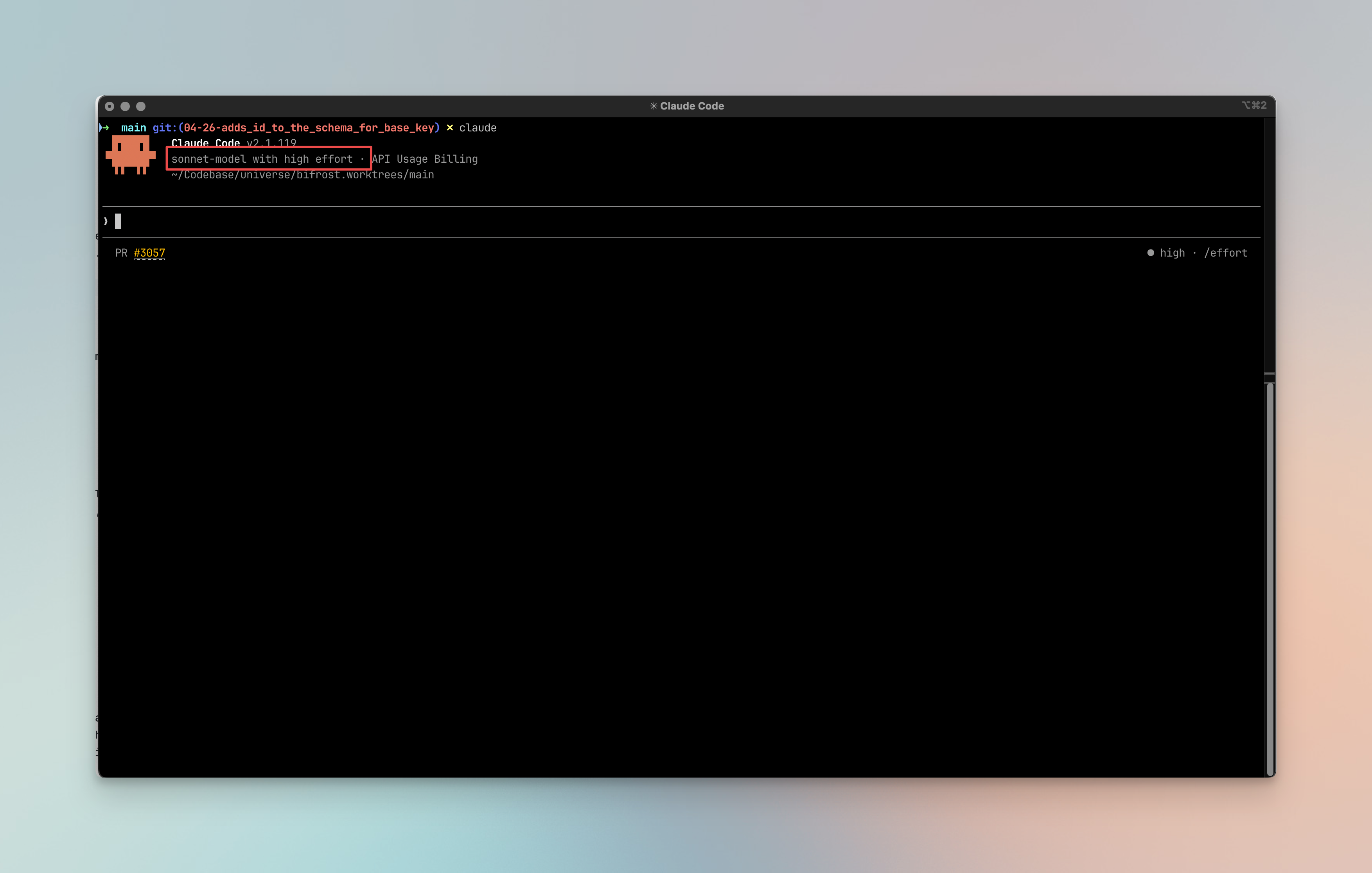
If this is not the case -
- Select model using /config
- Execute
/config - Search for model
- Select the correct model
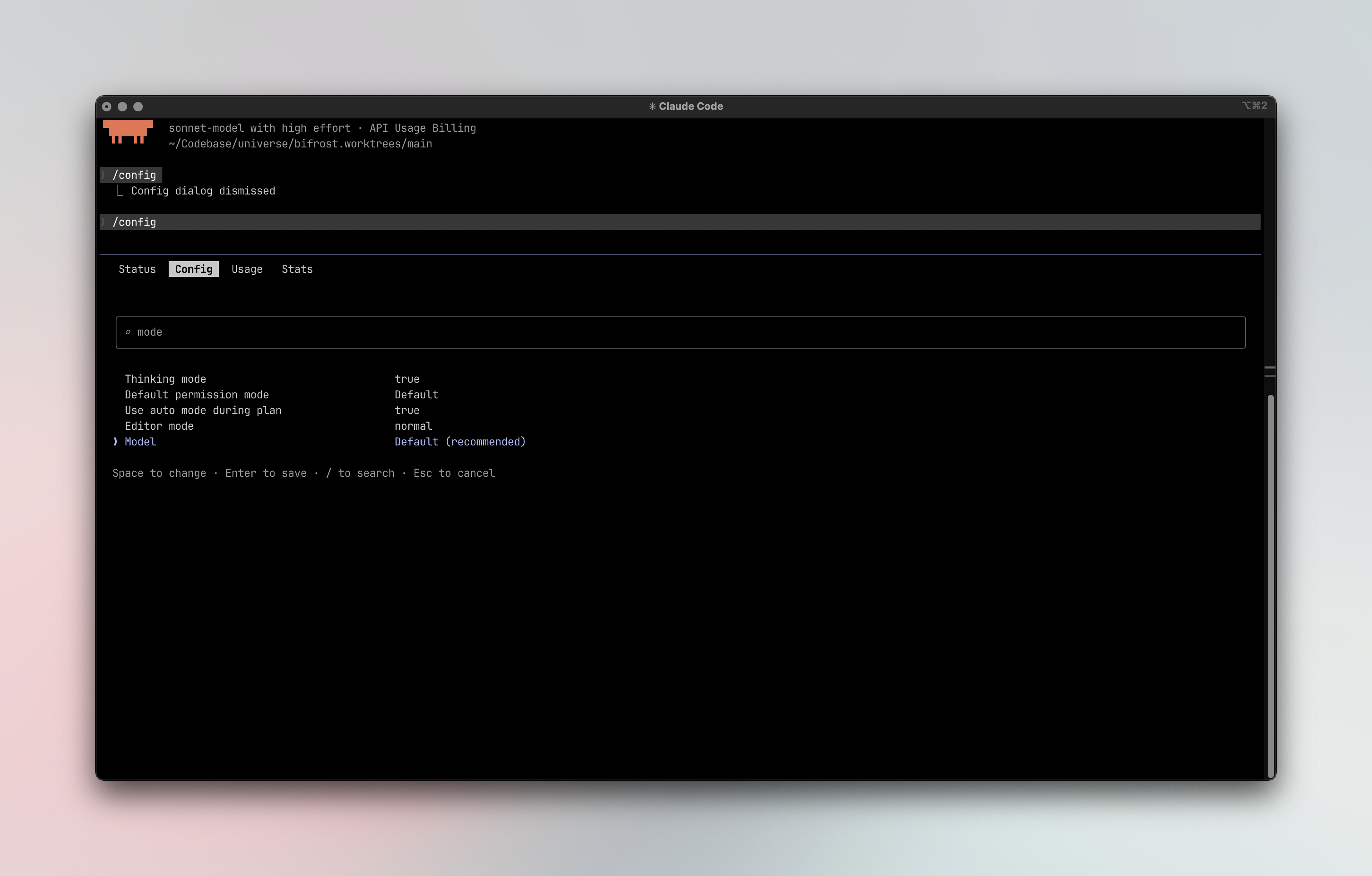
- Or pass the model using
/model <model_name>e.g.,/model sonnet-model